All accounts. Any currency. One app.
A screen for every question
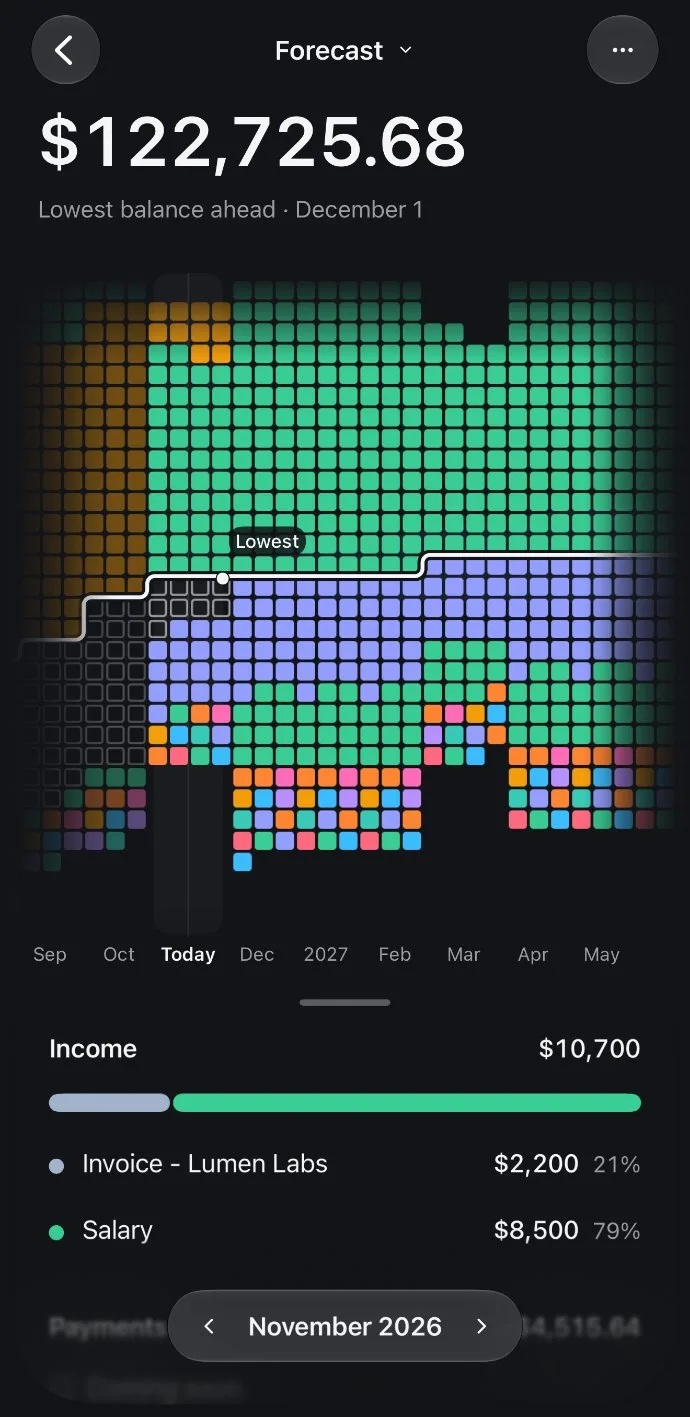
Dashboard: the answer, the forecast, wallets and activity on one screen. Forecast: net worth for each month ahead. Wallets: the balance in each currency. Activity: transactions with categories and amounts. Reports: the answer as one figure, split by category. Recurring: dates and amounts for the months ahead.
Check net worth month by month
Total net worth Net worth at the end of this month Income €120,000, spending €78,800 this month. A transfer between your own wallets is neither income nor spending. Coming months Net worth at the end of next month, as planned This month isn't over. The plan for the next two months is in the forecast: income, recurring transactions and budgets. Recurring transactions Recurring transactions this month Mortgage, utilities, internet, gym and subscriptions: each transaction has its own cells in every month. Budgets Budgets this month In the forecast, the grocery, café and transport limits are expected spending. Other categories have no limit. Moving a transaction Net worth at the end of next month after the move Gifts of €9,000 are planned one month earlier. Its cells are outlined.
Record it any way you like
Type a line Taxi €2.50 11/2 Food delivery €9.30 11/3 Supermarket €25.90 yesterday A name, an amount and a day are enough: if the name matches a word added to a category, that category is already chosen. Say it instead Coffee shop €7.40 today Say the same line aloud and it is recorded just as if you had typed it. Upload the bank file October_statement.csv184 transactions Uploaded SupermarketOctober 1 Coffee shopOctober 2 SalaryOctober 5 A CSV file from your bank fits: dates, amounts and descriptions are already in the rows, so there's nothing to retype. Check the rows before saving SupermarketOctober 1 SupermarketOctober 1 · already added Duplicate Coffee shopOctober 2 SalaryOctober 5 A duplicate is marked: that transaction is already in Tetri. Set a category by rule When the description contains
Coffee shop , the category isCoffee .Add the phrase Coffee shop to the Coffee category, and every transaction with it in the description gets that category. Compare budgets with spending Groceriesof Coffeeof Groceries: €12,600 of €19,200 spent, €6,600 left. Get the total as one figure How much was spent on food this monthGroceries87% of the total Coffee13% of the total Food spending: €32,550 this month, 87% on groceries and 13% on coffee.
How much is spent and how much is left
Spending by category this month
Budgets: spent and left
Currency conversions
Transfer network
Your year in squares
This month vs last
The same wallets and forecast are on iPhone
Pick a plan for your task
Free
Workspaces: 1, up to 3 wallets Up to 3 budgets and 3 recurring transactions Up to 5 service subscriptions Up to 5 statement imports a month History and reports: last 3 months Export to CSV and record transactions in Telegram
Plus
Up to 2 workspaces No limits on wallets, budgets or recurring transactions Full history and reports for any period Cash flow forecast and goals Split transactions and custom currencies PDF import and receipt recognition: 10 a month
Pro
Everything in Plus Up to 5 workspaces, shared with invited members Scenarios and FX gain and loss Taxes for a period Assistant and automation rules API and MCP for your own tools
Start with one statement
Upload a file from your bank and see your net worth for the months ahead.